
Countdown Timer: Beautiful Focus Timer With Particle Effects and Background Music
Published on August 05, 2025
Countdown Timer: Where Productivity Meets Visual Beauty
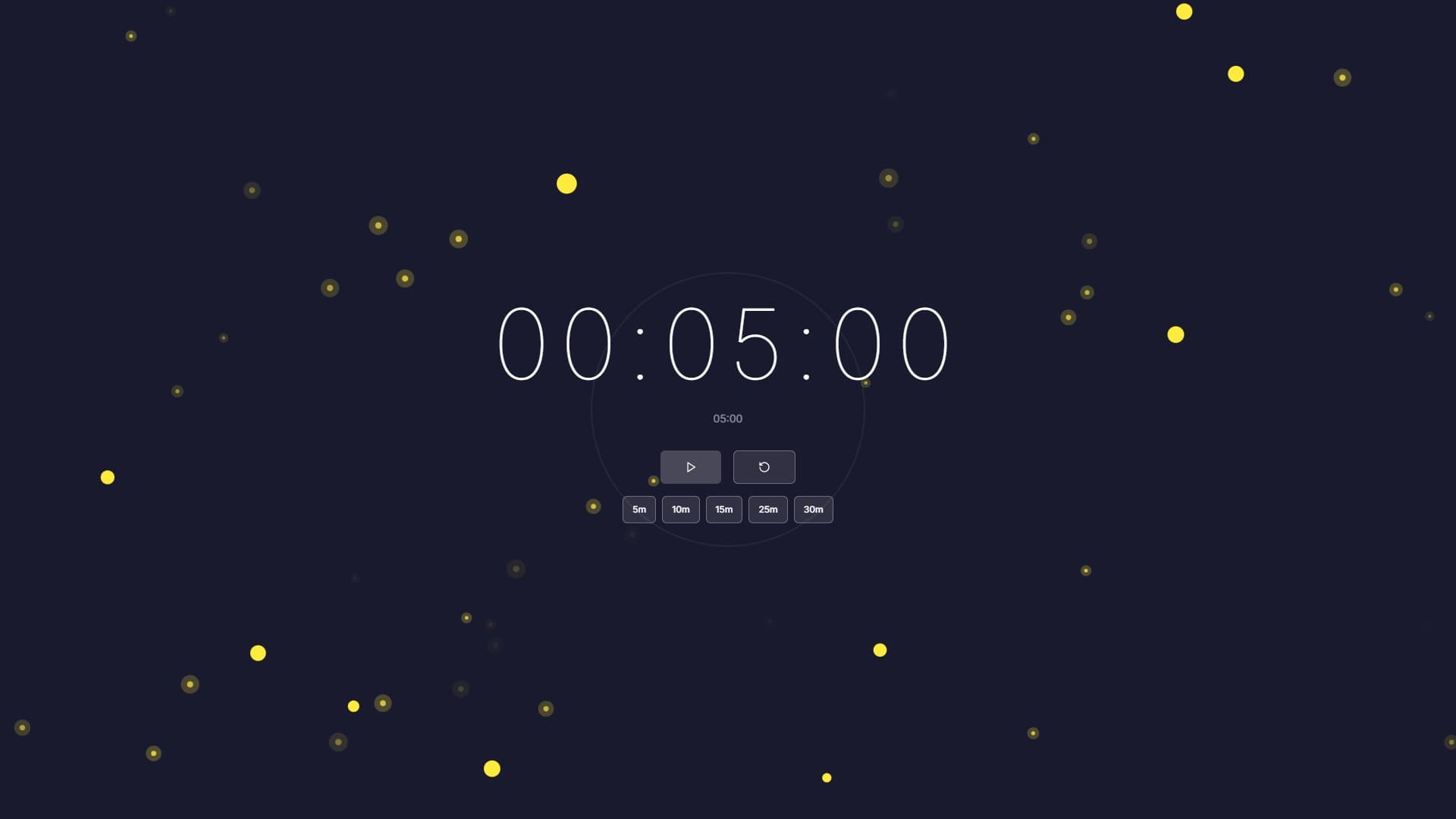
Time management tools typically prioritize function over form, resulting in utilitarian interfaces that do the job but inspire little enthusiasm. WebLight.app's Countdown Timer breaks this mold, combining powerful timing functionality with stunning visual effects, multiple clock styles, soothing background music, and mesmerizing particle animations. It's not just a timer - it's a complete environment for focused work, meditation, or any time-bound activity.
More Than Just Counting Down
At its core, Countdown Timer does exactly what you'd expect - counts down from a specified duration and alerts you when time expires. But the execution elevates this simple function into something special:
Multiple Clock Styles: Choose from classic analog displays, modern digital readouts, minimalist progress rings, or bold countdown numerals - each offering a different aesthetic and psychological approach to time perception.
Particle Effects: Beautiful particle systems create dynamic, calming backgrounds that provide visual interest without distraction. Watch gentle snowfall, floating bubbles, or abstract particles drift across your timer.
Background Music: Optional ambient music or nature sounds help create the perfect atmosphere for focused work, meditation, or relaxation.
Completion Messages: Customize what appears when your timer finishes, from simple "Time's Up!" messages to personalized motivational text.
Color Customization: Adjust every color element to match your mood, environment, or personal preferences.
Perfect for Pomodoro Technique
The Countdown Timer has become a favorite among Pomodoro Technique practitioners:
25-Minute Focus Sessions: Quick preset for standard Pomodoro work intervals lets you start timing with a single click.
5-Minute Short Breaks: Easily set short break timers to maintain the Pomodoro rhythm without interrupting flow.
15-Minute Long Breaks: After four Pomodoros, take your longer break with visual and audio cues that encourage genuine rest.
Visual Progress Indication: The progress ring visualization provides at-a-glance understanding of how much time remains without requiring you to do mental math.
Gentle Transitions: Unlike harsh alarm timers, the particle effects and optional music create a more peaceful transition between work and break periods.
The psychological impact of working in a beautiful environment shouldn't be underestimated. Many users report that the timer's aesthetic appeal makes them more willing to start focus sessions and more likely to respect break periods.
Meditation and Mindfulness
Beyond productivity, Countdown Timer excels as a meditation tool:
Timed Meditation Sessions: Set any duration from brief 5-minute mindfulness moments to extended 60-minute deep meditation practices.
Visual Focus Points: The gentle particle effects provide a soft focal point for open-eye meditation without being overly stimulating.
Ambient Soundscapes: Background music options include sounds specifically selected for relaxation and meditation support.
Progress Awareness: The visual timer helps maintain session length awareness without the anxiety of watching seconds tick away.
Completion Without Disruption: Customizable completion messages and gentle alerts respect the meditative state rather than jarring you back to activity.
Workout and Exercise Intervals
Fitness enthusiasts use Countdown Timer for structured workout timing:
HIIT Intervals: Time high-intensity interval training with clear visual and audio cues for work and rest periods.
Yoga Practice: Set timers for holding poses or transitioning through sequences.
Stretching Routines: Ensure adequate time in each stretch with visible countdown tracking.
Rest Periods: Time recovery intervals between exercise sets with particle effects that encourage actual rest rather than phone scrolling.
Circuit Training: Coordinate multiple exercise stations with consistent timing across all activities.
Cooking and Kitchen Timing
The timer's visual appeal makes it ideal for kitchen environments:
Recipe Timing: Track cooking durations without constantly checking devices or asking voice assistants.
Multi-Stage Preparation: Set sequential timers for complex recipes requiring timed steps.
Baking Precision: Maintain accurate timing for temperature-sensitive baking where minutes matter.
Meal Coordination: Time multiple dishes to ensure everything finishes simultaneously.
Fullscreen Visibility: The large, clear display is easily visible across kitchen spaces, even through cooking steam or from distance.
Classroom and Educational Applications
Teachers and educators leverage Countdown Timer for classroom management:
Timed Activities: Keep students on task during independent work, group projects, or testing periods.
Transition Management: Use timers to signal upcoming transitions between activities, giving students mental preparation time.
Presentation Timing: Help students practice timed presentations with clear, visible countdown.
Test Administration: Maintain fair timing during assessments with obvious, distraction-free time display.
Brain Breaks: Time scheduled movement or mindfulness breaks to maintain student focus throughout long sessions.
The visual appeal reduces student anxiety about timing while maintaining clear awareness of remaining time.
Streaming and Content Creation
Live streamers and content creators find creative uses for Countdown Timer:
Break Timers: Display professional-looking break countdown during streaming intermissions.
Countdown to Events: Build anticipation for stream starts, special guests, or giveaways with visible countdown.
Challenge Timing: Time gaming challenges, speedruns, or creative exercises with clear audience visibility.
Production Breaks: Time recording breaks without pulling up bare-bones system timers.
Audience Engagement: The beautiful display keeps audiences engaged even during timing intervals.
Customization for Every Scenario
Countdown Timer's extensive customization ensures it fits any use case:
Quick Presets: One-click timing for common durations - 5, 10, 15, 25, and 60 minutes cover most needs.
Custom Durations: Set any specific time down to the minute for precise timing requirements.
Clock Style Selection: Choose visualization styles that match your preferences or current activity.
Particle System Options: Select from various particle effects or disable them entirely for minimal distraction.
Background Music Toggle: Enable ambient sounds for some sessions, silence for others, based on your needs.
Color Themes: Create different color schemes for different activities - perhaps calming blues for meditation, energizing oranges for workouts.
Completion Customization: Write personalized completion messages that motivate, inspire, or simply inform.
Keep the Timer Easy to Read
Pick a background that leaves the digits readable from your seat. Reduce particle movement if it distracts you, and try the timer without music before adding a loop. Preview the completion message and sound before using it during a class or shared work session.
The countdown help guide covers the controls and common playback problems.
Technical Excellence
Despite rich visual features, Countdown Timer remains technically robust:
Precise Timing: Accurate countdown synchronized with system time ensures reliability.
Performance Optimized: Smooth particle effects and animations run efficiently without draining battery or causing lag.
Responsive Design: Works beautifully on displays from smartphones to large monitors.
Audio Options: Multiple ambient sound choices or silent operation based on preference.
Setting Up Your Perfect Timer
Creating your ideal countdown environment takes moments:
- Choose Duration: Select a preset or enter custom time.
- Pick Clock Style: Select visualization that matches your activity and preferences.
- Enable Particle Effects: Choose particle system or disable for minimal distraction.
- Set Background Music: Enable ambient sounds if desired or work in silence.
- Customize Colors: Adjust color scheme to match your mood or environment.
- Add Completion Message: Write personalized text to appear when time expires.
- Start Timer: Begin your focused session, workout, meditation, or timed activity.
Transform How You Experience Time
Time management doesn't have to be sterile, stressful, or boring. Countdown Timer proves that functional tools can also be beautiful, that productivity apps can reduce rather than increase stress, and that taking time seriously doesn't mean taking it grimly.
Whether you're embarking on a focused work session, timing meditation practice, coordinating workout intervals, managing classroom activities, or simply cooking dinner, Countdown Timer provides an environment that makes time tracking genuinely pleasant rather than merely necessary.
Start Your Next Timed Session Right
Ready to experience countdown timing that's as beautiful as it is functional? Visit WebLight.app and explore Countdown Timer. Set your first timer, experiment with different visual styles and particle effects, and discover how much more enjoyable timed activities become when they're wrapped in beauty.
Because every minute counts, but there's no reason those minutes can't be gorgeous.