
Christmas Window Projection Ideas for Your Home
Published on September 25, 2026
Christmas Window Projection Ideas for Your Home
Strings of lights twinkle, but a window with snow drifting past it or Santa fading up to wave makes people stop on the sidewalk. The best part is that you can change the display every night without climbing a ladder.
Everything below uses Christmas Window Scenes, which runs in a browser tab. Its window scenes play on pure black, so only the decoration lights up, so on a screen in your window the projector's rectangle is far less noticeable than with an ordinary video. If you haven't set up the window yet, start with How to Project Christmas Decorations on a Window. It covers the film or curtain you need, and when to mirror the image.
1. Falling Snow: the all-December window
Soft flakes drift down in several layers. Small, faint flakes fall slowly at the back and larger, brighter ones fall faster in front, so the window looks deep rather than flat. Nothing resets or jumps, so you can leave it running from dusk to bedtime without the loop being obvious.
Where it works best: any window, but especially a large living-room or bay window seen from across the street. It's the scene least likely to feel repetitive, so it makes a good default for all of December.
Try this: increase Scale until the snow fills the whole pane edge to edge. Snow looks most convincing when you can't see where it starts.
2. Christmas Village: a festive backdrop for a wall or TV
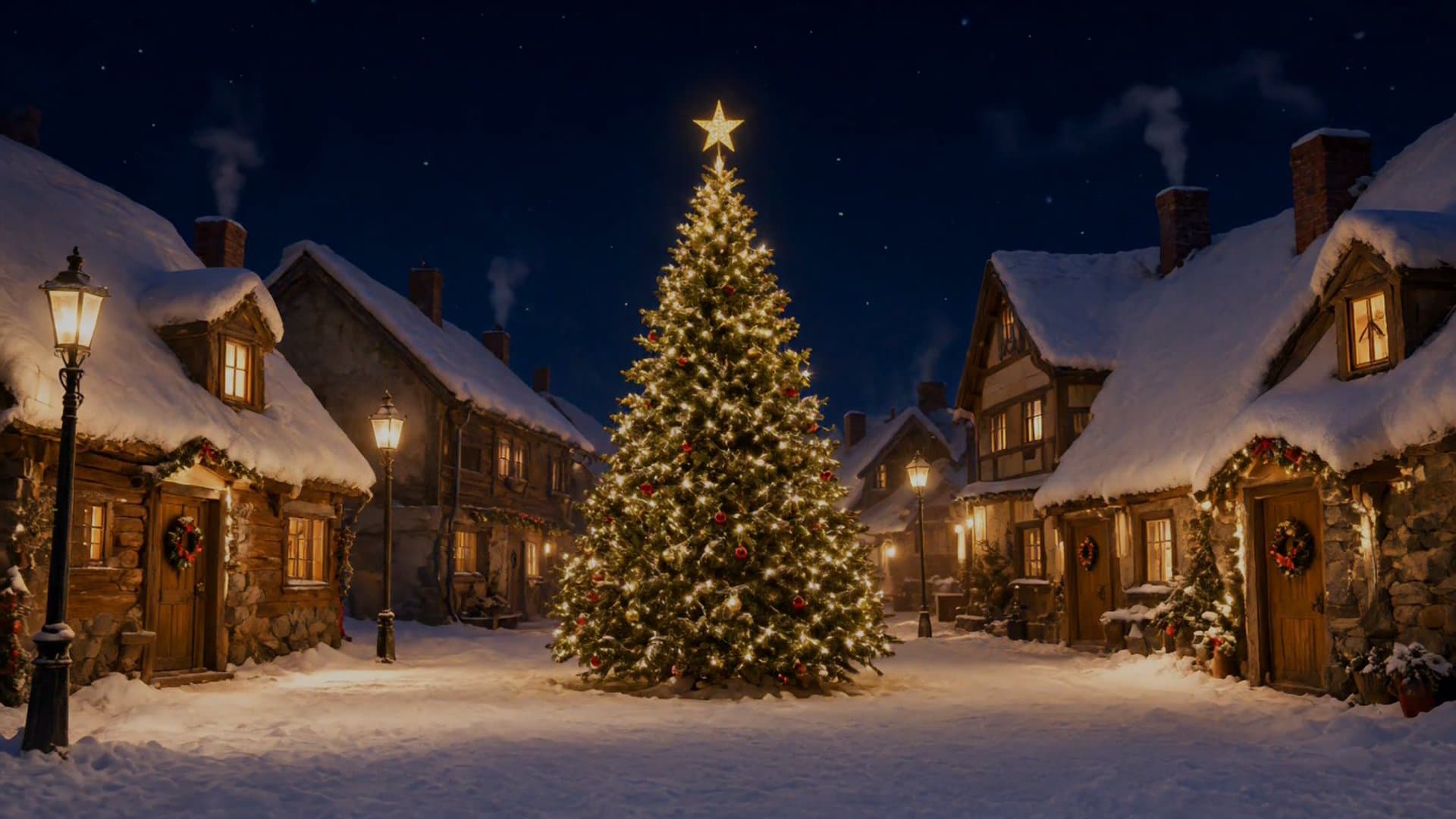
This one is a complete picture rather than a window decoration. It shows a small village square at night after fresh snow. A tall Christmas tree covered in warm lights and topped with a gold star stands in the middle. Snow-covered cottages with glowing windows and wreaths on their doors line both sides, and old iron street lamps light the snow. Smoke curls from the chimneys and drifts across a clear, starry sky, and the tree's lights dim and glow back up once each loop. The film itself has no falling snow, but you can add live snow over it with the Falling snow setting. Nobody walks through it, and it loops without a fade to black, so it doesn't blink dark every few seconds the way a short video on repeat usually does.
Where it works best: a living-room wall, a TV, or a garage door, anywhere a full picture looks better than a floating decoration. Set Display to Full scene to find it. It's calm enough to leave running behind a dinner table or a party all evening.
Try this: set Play to One scene and leave it on Christmas Village for the whole evening. The loop point has no fade or jump, so it just reads as a quiet snowy night.
3. Santa at the Window: the one kids point at
A full-size Santa fades up out of the darkness, waves, unrolls his list and reads it with a chuckle, waves again and fades back into the night. It's a short, friendly loop with no scare and no sound, which is right for a window people see from outside.
Where it works best: a ground-floor window at roughly adult height, so Santa appears to stand just inside. It's the scene that makes the biggest impression when children walk past, and the natural choice for the evening of a neighborhood light walk or a holiday party.
Try this: adjust Scale until Santa looks life-size in the window. On most setups that means the image is larger than the pane, and the black around him hides the edges. If you project from inside the house, turn on Mirror horizontally so he waves with the hand you'd expect.
4. Elf Workshop: a quick, cheerful visitor
A storybook elf in a green hat with a jingle bell fades up holding a red gift with a gold bow. The elf shows it off to the street with a big grin, tucks it under one arm, waves, and fades back into the dark. It's shorter and more cartoon-like than Santa, which makes it friendlier for very young children.
Where it works best: a smaller or lower window, such as a kitchen window, a garage side window or a basement window at child height, where a small figure looks right. It also pairs well with Santa: run Santa in the main window and the elf in a smaller one nearby.
Try this: use a smaller Scale than you would for Santa. An elf looks best at roughly child size.
Mixing scenes through the evening
You don't have to pick one. The simplest option is to set Play to Shuffle, go fullscreen, and leave it on all evening. Each scene plays once in random order before the effect reshuffles, and each fades through black into the next. One full cycle of the window scenes takes about two minutes at the default settings, so people who pass by more than once will usually catch a different scene. If you'd rather choose yourself, here are some combinations that work:
- Snow at dusk, Santa after dinner. Start the quieter scene while people are getting home, and switch to Santa for the busiest walking hour.
- Two windows, two scenes. With a second projector and laptop, run Snow upstairs and Santa or the elf downstairs. Different scenes look like a planned display. Two copies of the same one look like a mistake.
- A village for guests. If you're hosting indoors, project Christmas Village on the wall above the fireplace or the dining table, where it works as a festive backdrop rather than a show.
Getting the most out of any scene
- Darkness matters more than projector brightness. Turn off the lights in the room behind the window screen, and wait until an hour after sunset.
- Smaller is brighter. If a scene looks washed out from the street, reduce Scale. A smaller image is noticeably brighter.
- Check from outside. Mirroring, position and brightness all look different from the sidewalk. Walk out once before you settle on settings.
FAQ
Do I need to download anything? No. Falling Snow is generated in the browser. Santa at the Window, Elf Workshop and the full-scene films, including Christmas Village, are short videos that stream when you select them.
Can I play music with it? The window scenes are silent. Two of the full scenes, Santa on the Roof and Elf Toyshop, have a soundtrack of ambient sound and gentle music, with no talking, which you can switch on with Scene sound. It starts off. For a party, you may prefer your own playlist, and for a window facing the street, silence is usually better anyway.
Will it work on a TV instead of a projector? Yes. Put the TV in the window facing outward and open the effect fullscreen. The black background helps, but most TVs still glow faintly across the whole panel in a dark room, so the edges of the screen stay visible in a way that window film lit by a projector doesn't.
Can I use these for a Halloween display too? Use Halloween Projector Scenes for that. It has the same setup and controls, with ghosts, eyes and jack-o'-lanterns instead.
Start your window
Open Christmas Window Scenes on the computer connected to your projector and try each scene from the sidewalk. For warm light inside while the window does the work, pair it with the Fireplace effect on a TV. Browse all Projector Effects for more.
Try These Effects
Christmas Window Scenes
Project falling snow, Santa, a busy elf, a reindeer, a snowman, a toy train circling the tree, a crackling fireplace or a snowy Christmas village onto a window, wall or TV. Hologram scenes loop on black, so only the decoration lights up; full scenes fill a wall with a complete Christmas picture.
Fireplace
A realistic animated fireplace with layered flames, glowing logs, embers, smoke, and sparks
Halloween Scenes
Choose wandering spirits, watchful eyes, glowing jack-o’-lanterns, a zombie at the glass or a Victorian phantom. Loop a scene on your wall or position it for a floating projection illusion.
Related Articles
New Year's Eve Projector Party Ideas
Eight ways to use a projector, or just a TV, at a New Year's Eve party: from a slow starfield at dinner to fireworks at midnight, with the settings for each.
How to Project onto a Floor Without Mounting a Projector on the Ceiling
Floor projection usually means a ceiling rig. Three setups that work from a table or shelf, and how to fix the stretched picture an angled projector gives.
How to Project Fireworks on a Wall
Put a fireworks show on a wall, window or garage door with a projector and a browser, with no smoke and no noise complaints. Set it up and time the finale.