
The Best Christmas Projector Scenes, and Where Each One Works
Published on September 26, 2026
The Best Christmas Projector Scenes, and Where Each One Works
A projector and a free browser tab can do most of what a boxed Christmas projector does, but scene choice matters more than people expect. A character on black that looks magical on a front window looks thin on a garage door, and a busy full picture that fills a living-room wall looks like a TV screen stuck to the glass.
Every scene below plays in Christmas Window Scenes, free, with nothing to install. They're grouped by the effect's Display setting. Falling Snow appears in both groups, because it works under either display. Hologram scenes sit on pure black for windows, sheer curtains and scrims. Full scenes fill the frame, for walls, TVs and garage doors. If you're not sure which you need, Hologram vs Full-Scene Projection explains the difference in more detail.
Quick picks
| If you want… | Use | Display |
|---|---|---|
| Something passers-by notice from the street | Santa at the Window or Reindeer | Hologram |
| Something for kids | Snowman, or Christmas Train on the TV | Hologram, or Full scene |
| A calm backdrop for a party | Christmas Fireplace or Christmas Village | Full scene |
| Movement that runs for hours without a visible restart | Christmas Train, Christmas Village or Christmas Fireplace | Full scene |
| Background that suits any display | Falling Snow | Both |
Window scenes (Hologram)
These put a lit character on pure black. On rear-projection film or a sheer white curtain, the black barely shows, so from outside the character seems to stand in the window rather than sitting on a screen. They need a dark room and something across the glass, because plain glass doesn't hold an image.
1. Santa at the Window
Santa fades up out of the dark, waves, unrolls his list and reads it, rolls it back up, waves again and fades into black. It's the most recognisable scene for a front window facing the street. It's silent.
2. Reindeer
A reindeer in a red harness hung with brass sleigh bells fades up, lifts its head to look straight out at you, lowers it to sniff with a small wisp of breath, looks up again and fades out. It's slower and calmer than Santa, which suits a window that's on all evening. It has an optional soundtrack under Scene sound, with no talking.
3. Snowman
A snowman in a striped red-and-green scarf and a holly-trimmed top hat fades up, sways, closes its eyes in a happy blink, waves a twig arm and lifts its hat. It's a gentle pick for small children, and works just as well on a playroom wall projected small. It has an optional soundtrack too, with no talking.
4. Elf Workshop
An elf holding a wrapped red gift with a gold bow shows it off, grins, tucks it under one arm and waves. It's short and cheerful, and pairs well with Santa in a shuffled playlist. It's silent.
5. Falling Snow (on black)
Snow drifts down on pure black. Unlike the films, it's drawn live in your browser, so it never repeats. It's the gentlest window option, and snow looks right either way round, so you don't need to fiddle with mirroring. For more control over the snow itself, try Falling Snow Projector.
Wall, TV and garage-door scenes (Full scene)
These fill the whole frame, so there's no black for a projector's grey to show up in, and they cope better with a little room light. On a window, they'd look like a rectangle of video, so use them on opaque surfaces.
6. Christmas Train
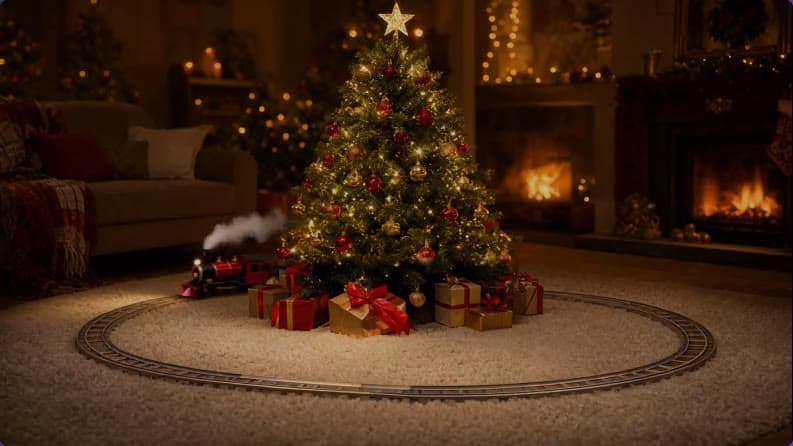
A toy steam train (a red and black engine, a green carriage and a red caboose) makes one full lap of an oval track around a lit Christmas tree. It runs along the front, round the bend, behind the presents and back to where it started. The loop has no visible join, so the train seems to circle the tree for as long as you leave it on. Put it on the TV near your real tree. It has an optional soundtrack, with no talking.
7. Christmas Fireplace
A stone fireplace with a crackling log fire, glowing embers, six knitted stockings on the mantel, a lit garland and candles, and presents on the hearth. Only the fire moves, and like the train it loops with no visible restart. It's the easiest backdrop for a dinner or a party on a wall or TV. It's silent, so put your own music on. If you'd rather have warm, flickering light than a picture of a fireplace, try Fireplace.
8. Christmas Village
A snowy village square at night: a tall tree covered in warm lights with a gold star, snow-covered cottages with glowing windows and wreaths, iron street lamps, and chimney smoke drifting across a clear, starry sky. It's another seamless loop. No snow falls in the film itself, so turn on Falling snow under Snow if you want live snow over it.
9. Santa on the Roof
Santa stands on a snowy roof at night, waves, walks up to a glowing brick chimney and smiles out from beside it. It's the big-picture version of Santa, made for a wall or a garage door facing the street. It has a soundtrack of ambient sounds and gentle music, with no talking.
10. Elf Toyshop
An elf in a lamplit toyshop paints red stripes on a wooden rocking horse, then holds it up with a proud smile. It's cosy and detailed, so it's best somewhere people can see it up close, like a living-room wall. It has sound, too.
11. Falling Snow over a Christmas market
In Full scene, Falling Snow drifts over a still picture of a Christmas market at night, with lit wooden stalls, festoon lights and a tall tree, which very slowly pushes in. It's a good opener before the character scenes.
Let it run all evening
You don't have to pick one. Set Play to Shuffle and the effect plays every scene for your Display setting in a random order, fading through black between them. It never plays the same scene twice in a row. The seamless loops (Train, Fireplace, Village) and Falling Snow stay up for Animated scene length, 60 seconds by default, and each of the other films plays twice.
A full Shuffle cycle takes about two and a half minutes in Hologram and about five in Full scene at the defaults. That's long enough that people walking past on different nights see something different.
Setup in two minutes
- Open Christmas Window Scenes on the device connected to your projector.
- Choose Display: Hologram for a window, Full scene for a wall, TV or garage door.
- Pick a scene, or set Play to Shuffle.
- Go fullscreen, then use Scale and position to fit the picture to your window or wall.
- If you're projecting from inside onto a curtain or film, turn on Mirror horizontally so it reads the right way round from outside.
The Christmas Window Scenes help article covers every control, the window materials that work, and what to do if the picture looks grey. If you're already planning ahead to next October, Halloween Scenes uses the same setup with a spookier cast.
Try These Effects
Christmas Window Scenes
Project falling snow, Santa, a busy elf, a reindeer, a snowman, a toy train circling the tree, a crackling fireplace or a snowy Christmas village onto a window, wall or TV. Hologram scenes loop on black, so only the decoration lights up; full scenes fill a wall with a complete Christmas picture.
Falling Snow Projector
Make it snow on a window, wall or TV. Choose gentle snowfall, a heavy storm, big drifting crystals, wind-blown snow or a magical sparkle, and let it settle along the bottom edge. Everything else stays black, so only the snow lights up.
Halloween Scenes
Choose wandering spirits, watchful eyes, glowing jack-o’-lanterns, a zombie at the glass or a Victorian phantom. Loop a scene on your wall or position it for a floating projection illusion.
Fireplace
A realistic animated fireplace with layered flames, glowing logs, embers, smoke, and sparks
Related Articles
New Year's Eve Projector Party Ideas
Eight ways to use a projector, or just a TV, at a New Year's Eve party: from a slow starfield at dinner to fireworks at midnight, with the settings for each.
How to Project onto a Floor Without Mounting a Projector on the Ceiling
Floor projection usually means a ceiling rig. Three setups that work from a table or shelf, and how to fix the stretched picture an angled projector gives.
How to Project Fireworks on a Wall
Put a fireworks show on a wall, window or garage door with a projector and a browser, with no smoke and no noise complaints. Set it up and time the finale.