
Hologram vs Full-Scene Projection: Which Should You Use?
Published on September 25, 2026
Hologram vs Full-Scene Projection: Which Should You Use?
Projector scenes come in two kinds, and picking the wrong one is the most common reason a holiday display looks off. A hologram scene is a character on pure black. Only the character gives off light, so on the right material Santa seems to hang in mid-air. A full scene is a complete picture, such as a snowy rooftop or a toyshop, with every part of the frame lit.
Neither is better. They answer different questions: what are you projecting onto, and how dark is it around the image?
Christmas Window Scenes has both, under one Display menu, so you can try each on your own surface in a few seconds.
The short answer
| Hologram (black background) | Full scene | |
|---|---|---|
| What you see | A character or decoration, with nothing around it | A whole picture, edge to edge |
| Best surfaces | Rear-projection film, sheer curtains, scrims, mesh, frosted glass | Painted walls, TVs, garage doors, pull-down screens |
| Works in a lit room? | Poorly. The illusion needs darkness around it | Better. A bright, busy picture holds up to some ambient light |
| The projector's rectangle | Mostly hidden, because black gives off almost no light | Visible, because it's the edge of the picture |
| Feel | A surprise that seems to appear in your window | A window into another place |
How a hologram scene works
"Hologram" is a borrowed word here. There's no laser or 3D trick. A projector can't project black. It just sends less light there, so the black parts of the frame barely show up. When a character is surrounded by black, the only thing the audience sees is the character.
That matters most on see-through or semi-transparent material. Hang rear-projection film or a sheer white curtain in a window and project Santa onto it from inside. From the street there's no screen, just a lit Santa standing where the glass should be. The same effect makes a ghost float on a scrim at Halloween, and it's the idea behind the stage illusion known as Pepper's Ghost.
Use a hologram scene when:
- You're projecting onto a window, with film, a sheer curtain or frosted glass.
- The surface is mesh, a scrim or a porch screen, where a lit backdrop would give the material away.
- You want the character to look like it's in the space rather than on a screen.
Where it falls short: on a plain wall, a hologram scene is a small character on a dark patch. Your projector's black is never perfectly black, so you'll often see a faint grey rectangle around the character. In a lit room that rectangle is more visible than the character.
How a full scene works
A full scene treats your surface as a screen. Every part of the frame has something in it, like a starry sky, snow on a roof or shelves of toys, so there's no empty black for a projector's grey to show up in. The frame's edge becomes the edge of a picture, which reads as intentional.
Use a full scene when:
- You're projecting onto a wall, a garage door or a pull-down screen.
- You're playing it on a TV. On a TV, the black around a character is just a dark screen with the frame and room around it, so there's no floating effect. A complete picture uses the whole screen.
- There's streetlight or room light you can't get rid of. A bright scene holds up to it much better than a character on black.
- You want atmosphere for a room or a party rather than a surprise for passers-by.
Where it falls short: on a window, a full scene looks like exactly what it is, a rectangle of video stuck to the glass. On a sheer curtain the lit background also shows the fabric's folds and texture.
The Christmas scenes, sorted
In Christmas Window Scenes, set Display first. The Scene menu then lists only the scenes that suit it.
- Hologram (black background): Santa at the Window and Elf Workshop. Each character fades up out of the dark, performs, and fades away, with nothing lit around it.
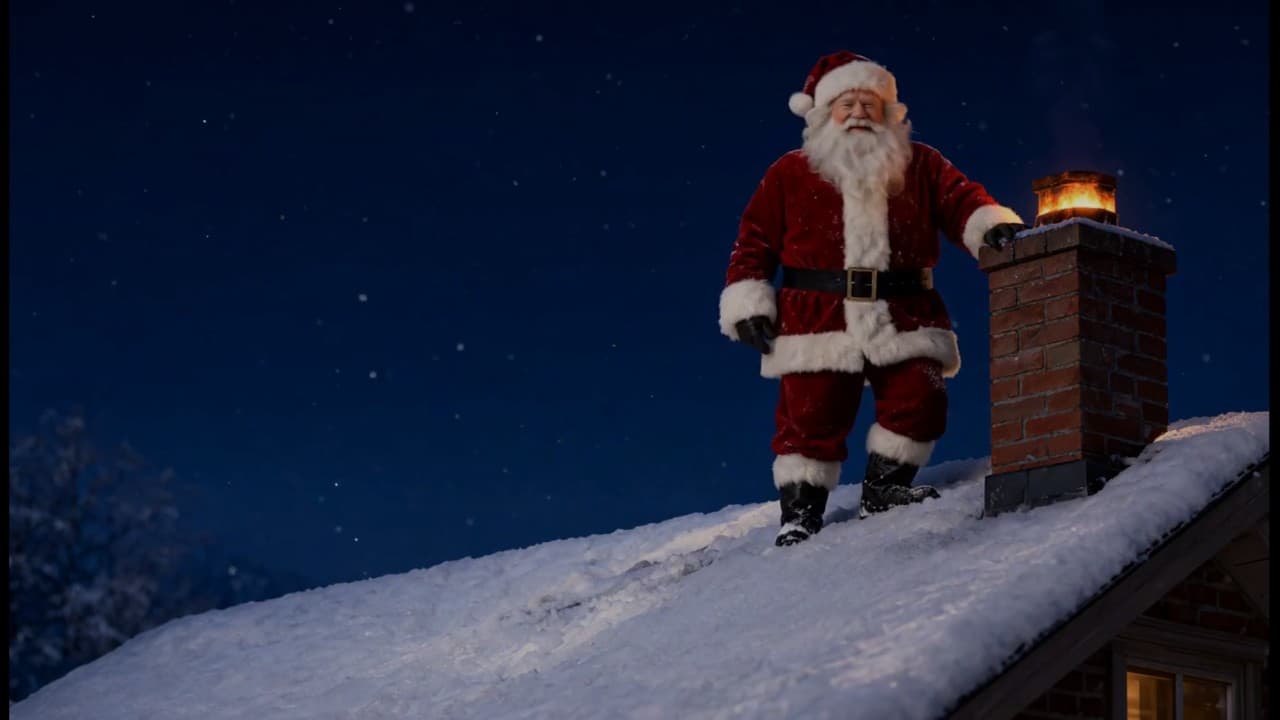
- Full scene: Santa on the Roof, Elf Toyshop and Christmas Village. These are complete pictures of a snowy rooftop at night, a cosy workshop, and a village square with a lit tree. Christmas Village loops with no fade at all, which suits a wall that stays on all evening.
- Both: Falling Snow appears under either setting. In Hologram it falls on pure black and reads as a window decoration. In Full scene it falls over a lit Christmas market at night, a complete picture for a wall or TV.
Play all and Shuffle respect the Display setting too, so a window display never shuffles into a full-scene picture partway through the evening.
Halloween Scenes is hologram-only for now, so it has no Display menu. Its wandering spirits, watching eyes, jack-o'-lantern and two short films all play on black, made for windows and scrims.
A quick test on your own surface
- Open Christmas Window Scenes on the projector and go fullscreen.
- Pick Falling Snow, which works under both settings, and set Scale so the snow fills your surface.
- Switch Display to Hologram and pick Santa at the Window. Step back to where your audience will stand.
- Switch to Full scene and pick Santa on the Roof. Compare.
If the hologram Santa looks like he's standing in the room, keep it. If he looks like a small figure on a grey patch, your surface or your room light suits a full scene better.
Mixing the two
Some setups use both. A front window can run a hologram scene for the street, while the living-room wall shows Fireplace or a full scene for the people inside. For a calmer backdrop on a wall or ceiling that isn't holiday-specific, Aurora Borealis fills the whole frame with slow colour.
For the window side of this, including which materials to buy and when to mirror the image, see How to Project Christmas Decorations on a Window. For scene-by-scene ideas, see Christmas Window Projection Ideas.
Try These Effects
Christmas Window Scenes
Project falling snow, Santa, a busy elf, a reindeer, a snowman, a toy train circling the tree, a crackling fireplace or a snowy Christmas village onto a window, wall or TV. Hologram scenes loop on black, so only the decoration lights up; full scenes fill a wall with a complete Christmas picture.
Halloween Scenes
Choose wandering spirits, watchful eyes, glowing jack-o’-lanterns, a zombie at the glass or a Victorian phantom. Loop a scene on your wall or position it for a floating projection illusion.
Fireplace
A realistic animated fireplace with layered flames, glowing logs, embers, smoke, and sparks
Aurora Borealis
Mesmerizing northern lights effect with flowing colors
Related Articles
New Year's Eve Projector Party Ideas
Eight ways to use a projector, or just a TV, at a New Year's Eve party: from a slow starfield at dinner to fireworks at midnight, with the settings for each.
How to Project onto a Floor Without Mounting a Projector on the Ceiling
Floor projection usually means a ceiling rig. Three setups that work from a table or shelf, and how to fix the stretched picture an angled projector gives.
How to Project Fireworks on a Wall
Put a fireworks show on a wall, window or garage door with a projector and a browser, with no smoke and no noise complaints. Set it up and time the finale.